
Solo Travel Planner App to Map Routes, Build an Itinerary, and Book Stays
Planning a solo trip doesn’t have to feel daunting.
That’s why we built your new home base for every solo adventure. Discover, plan, book, and share trips all in one.


As Featured In











The travel planning and booking app for solo travel
After 10min, 60% of travelers say they’d be "very disappointed" to go back to their old way.


Used by 50,000+ solo travelers in 183 countries
"I tried many apps for travel planning and keeping all my activities, notes, links, bookings, and tickets synched across devices. Pilot eventually is the solution I was always looking for. Worked like a charm."
- Jens T. 36-44, Germany




Au Pair Travel


Solo Backpacking

Digital Nomading

Eurotrips
Travel solo with more freedom and less second-guessing


Discover and map out ideas
Have AI suggest itineraries and ideas or browse curated lists of things to do and places to stay, then use up to 60 filters to narrow fast.
Grab practical details like website, socials, and phone, then save what feels right straight to your plan or a shortlist to decide on later
Read & search through reviews from other travelers
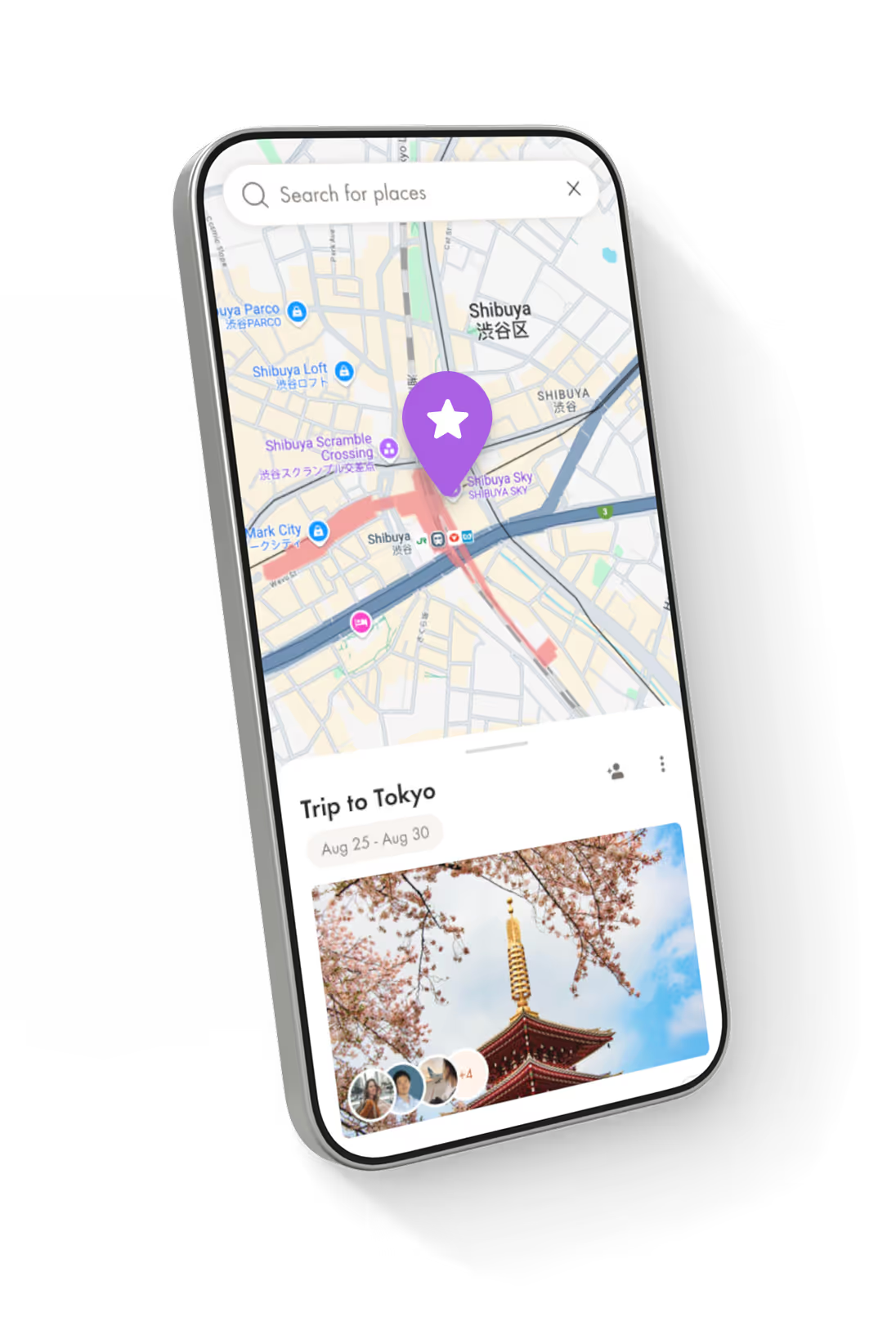
Lay everything out in a customizable map view for deciding on days and routes







Decide on routes and days
Build rough plans to have the structure needed to stay flexible without wasting time researching when you're there, then drag and drop to reorder and delete items as the plan changes.
Use lists for packing, must-dos, and “only if I feel like it” ideas.
Get travel eVisas & requirements in a few clicks to navigate entry rules early.








Book, sync and stay organized
Book stays to make the plan real, using discounted private rates usually reserved for travel agents that are better than public booking sites like Hostelworld or Expedia.
Import confirmations (screenshots, tickets, hotel docs) to detect and attach booking details to your trip
Export your trip as a PDF or view offline, and keep trip files accessible in-app when you have low signal.
Keep all activities, notes, links, bookings, and tickets synched across devices







Solo travel is better with Pilot

Your

to inspired adventures
Save big, plan smarter, and become the one everyone wants to travel with.
Pay what you want
Even nothing, with optional premium add-ons and services.
Save on +3.2mil hotels
Direct bookings partnerships so you avoid fees and book with illustrious rates reserved for travel agents.
Offline access
Export trips in impressive Futura font. Plus low battery drain for when away from wifi or power.
Luxuriously easy
Without hidden fees or pressure to book. Like Notion for travel. Start a trip plan in just 5 minutes.
Actually good support
It might feel like flirting, but it's actually real humans who stick with you plus quick AI answers. No call centers.



Frequently Asked Questions
How do I decide where to go for solo travel, and can Pilot help me build a customizable, detailed itinerary?
Pilot helps you pick a destination by letting you browse ideas and build a real itinerary fast, instead of keeping everything in scattered notes. You can use Pilot’s AI travel planning features to generate a draft itinerary from your destination, dates, and travel style, then edit it until it fits you. Pilot also supports exploring things to do for a specific city inside your trip, opening detail pages (with key links like websites and socials), and saving options for later so you can compare without losing track.
Can AI plan a solo trip for me, and how do I refine the results to match my travel style?
Yes, Pilot’s AI QuickStart creates a starting itinerary based on inputs like destination, dates, travel style, and preferences, and it can generate or edit full itineraries using prompts and 60+ filters. After it generates a plan, you can revise it by swapping activities, changing pacing, adding your own places, and keeping notes and files attached to the right day so your itinerary stays usable. The point is that the AI gets you to a strong first draft quickly, and then you keep full control.
How do I properly plan a solo trip from start to finish using a digital travel planner?
A solid solo travel plan starts with a clear itinerary you can actually follow, plus a single place to store confirmations, tickets, addresses, and “what’s next.” In Pilot, you build your trip in one planner where you can add, edit, or delete anything as your plans change, and you can keep the supporting details (files and notes) inside the same trip so you are not hunting through email threads later. If you want a backup you can use anywhere, Pilot also supports exporting your trip as a PDF.
Can I plan a multi-stop solo trip with a free solo travel planner app?
Yes, Pilot is built to handle multi-destination itineraries, including adding as many stops as you want and keeping the plan organized by day and place. Pilot’s AI itinerary builder is also positioned for multi-stop planning, since it can suggest routes and daily schedules, and then you can adjust the order and details to match your pace. The Trip Planner is free to use.
How do I create a budget-friendly solo travel itinerary with app support?
Budget-friendly solo travel planning is mostly about making tradeoffs early and locking in the biggest costs first, especially lodging. Pilot supports finding and booking stays, and it also promotes private hotel deals that similar to discounts usually reserved for travel agents, which can help reduce your biggest line item. For daily spending, a practical approach is to plan a realistic “must-do” spine of the trip, keep optional items in your saved list, and use notes to track budget targets and reminders so you do not overspend by accident.
Can I book flights, accommodations (hostels, hotels, Airbnbs), and activities through the app, and can it integrate my existing reservations?
Pilot supports browsing and booking accommodations like hotels, hostels, and vacation rentals, and it also lets you add existing bookings no matter where they’re from. For flights, Pilot includes a “find flight deals” flow that opens a flight search once you add a flight section to your itinerary. For existing reservations and tickets, Pilot can import files (like confirmations and screenshots), scan them for key details, and suggest the right itinerary items to add, and you can also forward bookings by email to import them.
How do I use Pilot to organize solo travel details efficiently, so nothing is missed?
A good solo travel organizer app should make it easy to keep “plan” and “proof” together, meaning your itinerary plus the documents that make it real. Pilot’s Files tab is designed for confirmations, reservations, tickets, photos, and other trip documents in one place, and it can attach files to a specific transportation, accommodation, or activity item so everything stays organized. Pilot also supports notes for reminders, packing lists, or quick context like “how to get from the airport,” so you can run the trip from one hub.
Does Pilot offer offline access so I can use my itinerary and travel details without Wi-Fi or data, like on a flight or in remote areas?
Pilot’s AI trip planner is explicitly positioned to suggest attractions and “hidden gems” based on what you ask for, which is a good way to get solo-friendly ideas like walking tours, cooking classes, day trips, or small group experiences. Inside your trip, Pilot’s Explore tab lets you browse things to do for a specific city, open detail pages with key links (like websites and socials), and save options so you can decide later. If you want “joinable” solo experiences, you can prompt the AI for “small group tours,” “day tours,” or “social activities,” then save the best options and keep the booking links and tickets attached in your trip files.
Does Pilot suggest local experiences, hidden gems, or solo-friendly group tours I can join?
Successful solo travel is mostly about having a plan you can adapt, plus backups for the moments when your phone dies, Wi-Fi drops, or something gets cancelled. Pilot supports flexible editing of your itinerary, plus exporting a PDF so you always have a usable version of your plan offline. For safety and stress reduction, it also helps to keep all reservations and key documents organized in one place and to share your itinerary or core details with a trusted contact, which is standard guidance in many official travel safety resources.
How do I solo travel successfully, especially when plans change mid-trip?
Successful solo travel is mostly about having a plan you can adapt, plus backups for the moments when your phone dies, Wi-Fi drops, or something gets cancelled. Pilot supports flexible editing of your itinerary, plus exporting a PDF or using offline mode so you always have a usable version of without internet. For safety and stress reduction, it also helps to keep all reservations and key documents organized in one place and to share your itinerary or core details with a trusted contact, which is standard guidance in many official travel safety resources.
What should I avoid when solo traveling to stay safe, save money, and reduce stress?
Avoid arriving unprepared, because most solo-travel stress comes from missing basics like entry rules, local norms, and what to do if something goes wrong. Government travel guidance for women emphasizes researching the destination’s legal system and social customs ahead of time, which helps you avoid avoidable risks and awkward situations. It also helps to avoid oversharing your exact lodging and next stops with strangers, and to keep your plans and documents organized so you are not forced into rushed decisions that cost more.
How do I start solo traveling as a woman, and what planning steps matter most?
Start by checking official travel guidance for your destination, because risks and norms vary a lot by country and region, and women can face extra legal and safety issues in some places. Canada’s travel guidance recommends learning the legal framework and social customs around gender norms before you go, and the U.S. State Department similarly encourages destination research and basic safety planning for women travelers. In Pilot, the planning steps that help most are keeping your itinerary clear, keeping important documents accessible, and having an offline backup like an exported PDF, so you stay calm and in control when you are on your own.
What features should a good solo travel planner app have?
A strong solo travel planner should help you decide what to do, turn it into a day-by-day itinerary, and keep the “proof” like tickets and confirmations attached to the plan. Pilot covers this with an itinerary builder you can edit, an Explore area for finding things to do by city with detail pages and links, and a Files system that stores and organizes bookings and documents in one place. A good solo planner should also support offline access, and Pilot supports that through PDF export and offline-friendly mobile access for key trip details.
What is the best solo travel organizer app, and is Pilot a good choice for solo travel planning?
The best solo travel organizer app is the one that matches your planning style, meaning how much structure you want, how often you change plans, and whether you care more about discovery, mapping, or keeping documents tidy, and helps you book and save money on your plan. Pilot is a good fit for this, and if you want one hub for itinerary planning, exploring things to do, storing files, and keeping offline backups, without needing a pile of separate tools. If you mainly want an app that just forwards your confirmations into a timeline and never touch it again, you may prefer a pure itinerary inbox tool, but Pilot is aiming to be both a planner and a flexible trip workspace.
Is the interface intuitive and easy enough for less tech-savvy travelers to use effectively?
Pilot is set up as a single trip hub with clear sections like itinerary, files, and notes, which reduces the learning curve compared with juggling spreadsheets, docs, and email folders. If someone is not very tech-savvy, the easiest way to make it simple is to keep the itinerary clean, attach the key confirmations in Files, and export a PDF that they can open like a normal document if needed.
Is Pilot a free solo travel planner, and how does it make money?
Pilot is free to use with no hidden fees, with support coming from optional add-ons and services. Pilot also promotes a lodging savings model that includes private and closed-member hotel deals, and the product itself is a discovery-first platform with direct hotel integrations rather than a traditional online travel agency. In practice, that means the core planner can stay free while revenue can come from optional services.